

Beginners guide to Substack
Focussing on academic use


Introduction to this guide
In the first part of this article I explore reasons to use Substack, to help the undecided work out what they might do with it. This is written for academics and students in the Arts Faculty at the University of Warwick.
Jump to the second part if you want to dive into the detail of how to use it.
Part One: what and why
What is Substack?
As is often the case these days, Substack as a whole is not simple. There are few simple platforms. Substack began life as a newsletter platform. Set up a substack, create your profile, get subscribers, write a newsletter using the Substack editor, and your subscribers receive it in their email inbox. Simple.
But I use it more like an old-fashioned blog, as do many people. It has many of the features that we had with our groundbreaking Warwick Blogs platform, the first academic blogging platform in the world.
Since Substack’s introduction there has been a creeping addition of new features, and the overall conceptual design of the platform is a bit of a mess.
It is not well designed. But with a bit of guidance you will find it really useful.
There are overlapping aspects of the platform, some of which look confusingly similar (profile, publication, newsletter, notes, audio, video, live). I’m still not really sure how it is all supposed to fit together. But I just use the part of it that works best for me.
And the phone app version also presents things very differently. I don’t use it.
In this guide we are going to focus on Substack publications, which seem to be the most obvious fit with academic work. They are sometimes called substacks or newsletters. Although your profile, which is not a publication, may also be a substack and a newsletter.
And now there’s also Notes, which is a microblog like Twitter, built into Substack. I mostly use it to publicise my publication posts.
Ignore the confusion.
Follow me!
I have a profile (necessary). And have added three publications:
DAHL News and Views (the one you are reading this on).
Museum Explorations (for our museum studies network).
Transversality (my personal publication, on which I will write about my travels in Southern Africa, overland motorcycling, wildlife photography, reading, and my research).
Profiles
When you create an account in Substack you get what is called a Profile.
You can create posts just within your profile, and re-post other people’s posts (restacking). You can also create notes.
People can subscribe to your profile, and receive new posts by email, or see them in the app. They can also go straight to your profile homepage.
When you create your account, you have to provide a “handle”. This is used to create the homepage url for your profile. So if your handle is drrobertotoole then your url will be http://substack.com/@drrobertotoole (click on that to see my profile).
Now when you go to http://substack.com and sign in you see a Twitter-like timeline of posts and notes from accounts you are following or subscribed to (there is a difference), as well as suggested posts and notes from other accounts. This is also what you see when you open the app. It looks like this:
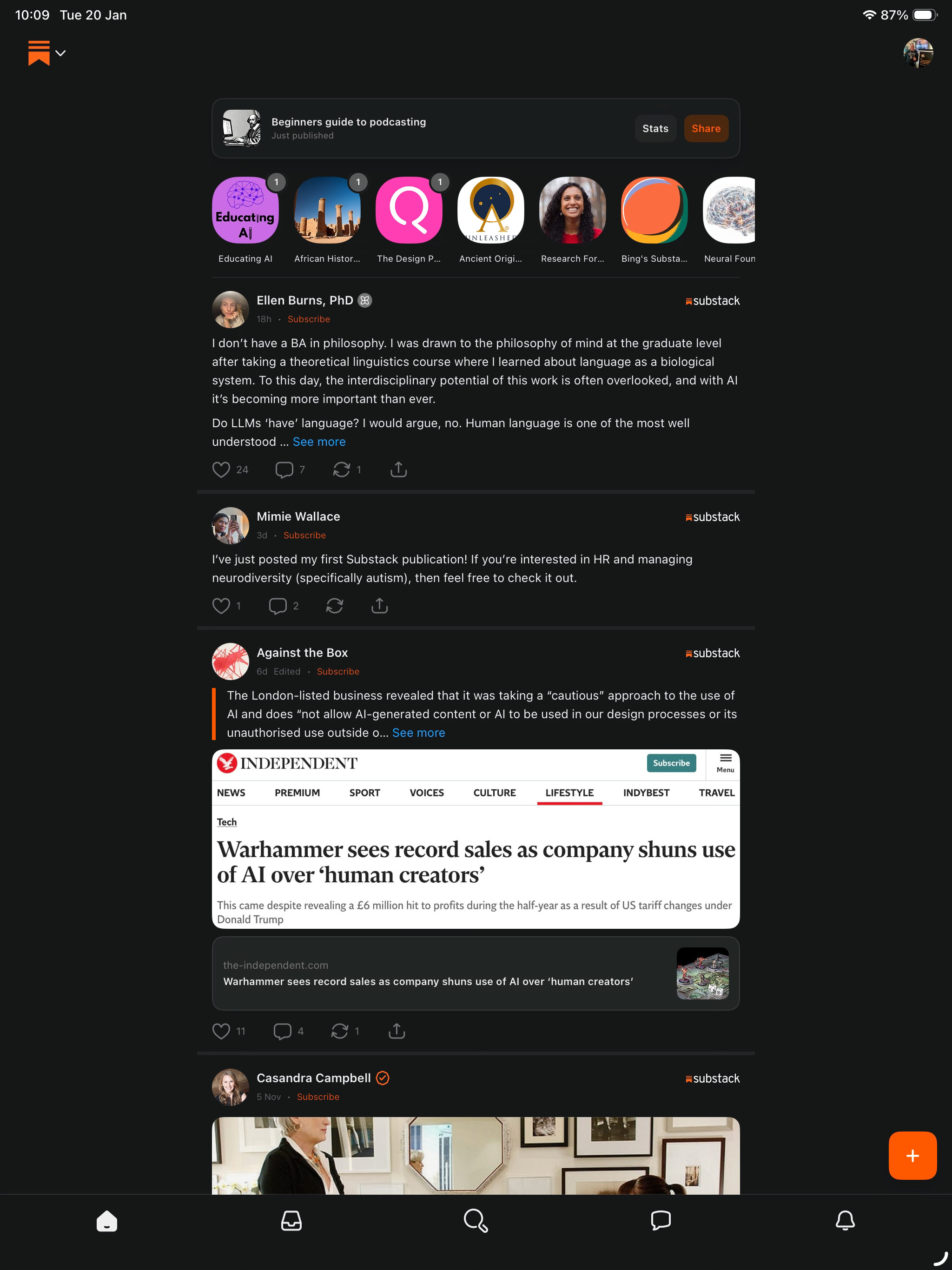
I can view my profile in the app by clicking on the round icon in the top right. Or in the web browser, using the profile link towards the bottom left.
Although I can write blog-style posts in my profile, this is not a publication, and cannot have the kind of customisable blog-like layout of a publication.
To begin with you can only write posts that appear on your profile, under the Activity and Posts tabs. You can also write notes, and send messages to people. The profile is quite like Twitter.
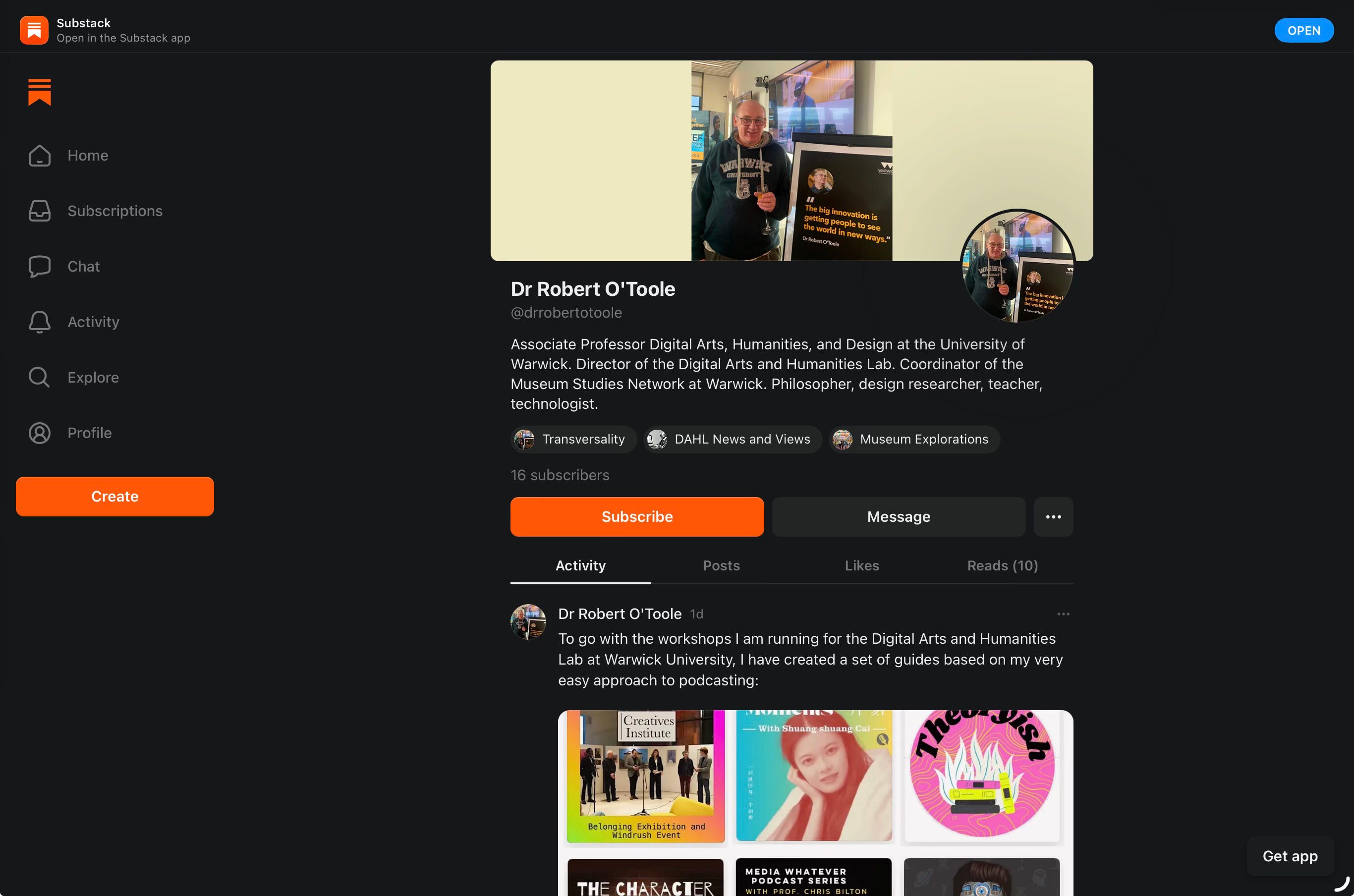
Just below the my short text description you can see my publications listed.
Once you have created publications, any posts you make there also appear in your profile. If you contribute to other publications as a guest, those posts appear here as well.
Publications
Think of a publication as being equivalent to a blog. It has an identity, themes, and sub-themes. Latest posts are displayed on its homepage. Posts can be organised into categories using tags, and visually grouped together. Publications can also be written by more than one person. So for example I have invited Bing to co-wrote an article on Museum Explorations.
For me, publications are the interesting part of Substack, where in-depth content is developed over series of articles - and think of them as being articles not simply posts. They might even be full length essays. They can also use images, audio, and video.
As with the profile, people can subscribe to your publications, and receive new posts by email (when publishing you can choose not to sent a new post as email too, so as to control the amount going to inboxes).
In terms of format and genre, many of the articles in Substack are more like online essays. Not necessarily in a traditional academic style, usually a bit more media friendly. They can also include images, audio, and video.
And to add to the complexity, subscriptions can be free, or paid. Writers can make all, some, or none of their content free to access. Yes, you can, if your content is worth paying for, earn money. People can also just donate money to you? Do you want to buy me a virtual coffee? For me, the important thing is high availability. So my work is free.
I suggest ignoring all of that complexity for now, and treating it as just a really good simple place for write, publish, and share articles.
What do you want to publish?
There are no editors, no censors, no rules as to what a Substack should be about. There are three principles I suggest we follow:
Publish articles that are useful to yourself and your development - writing is a great way to develop your ideas, your interests, your ability to communicate, your creativity, and your confidence. In the past I have been an avid blogger. In 2006 we created the world’s first academic blogging platform, Warwick Blogs. By writing a few good articles a week I went from being a very good writer of philosophical work on aesthetics (from my undergrad study at Warwick), to someone who could write clearly and engagingly on any topic - almost a professional writer. The best way to develop your writing is to write, reflect on your work, and improve. Regularly take on new writing challenges. And if you can, get an audience who will provide free feedback.
Publish articles that are useful to an audience - you might know people who will benefit from your writing. An audience. They might be there already, or you might aim to develop the audience. This might even become a community. That certainly happened with Warwick Blogs, and we are seeing it again with Substack.
Publish articles that you just think the world needs, even if they don’t necessarily know it - Substack is a great place to be a bit more radical, to campaign, to begin the revolution, whatever you want that to be.
Publish trivia, fun, asides, any old stuff - I have a personal Substack, apart from my two community-based ones. I published a video of myself eating an unusual Chinese sausage given to me by fellow Substacker Bing. Why not? It’s my space.
And that leads to an important distinction. A substack can be about a specific theme or topic. I have set up the Digital Arts and Humanities Lab substack, and one for Museum Explorations. They will belong to a community of people, with articles written and edited collaboratively. I also have my personal one. Have as many as you like. I’ve seen some that are deliberately designed to run for a specific length of time, dealing with a topic as a series of articles, or accompanying an event. There’s no reason that we should think of them running permanently (the same is the case for other media, like podcasts).
Should you use AI?
Substack does have a generative AI feature (as of January 2026), but only for creating illustrative images. There’s been a lot of chatter, some of it a bit angry, about AI generated text appearing in Substack. On the whole people are really not happy about that!!!!! (can I say that anymore loudly without Trumpian caps-lock?).
Substack is seen as a place to create and to read high quality writing, written by authors who really care about their subjects, and who have something personal to bring to it. AI generated text is shallow, uncommitted, full of lists and weak comparisons. Sometimes it even generates distracting metaphors. And hallucinations. It just makes things up. But worse of all, it has no empathy. AI doesn’t know the pleasure of reading great text. AI doesn’t know the pain of reading bad writing. AI doesn’t have a visceral sense of the risk involved in writing something at the edge, something that might be difficult to say but which you’ve just got to say.
AI doesn’t benefit from the pain and pleasure of writing.
We’re here to get better as humans, not to provide free training for some idiot billionaire’s hallucinations.
So the answer is no.
It’s not clever, it’s not healthy.
Part Two: how to get started
1. Become a guest writer on an existing Substack
This is a good route in, as you get to focus first on using the interface and workflow for writing and publishing articles. The owner of the substack can add other people as authors of an entry. They might even start writing it and give some structure and guidance for the other author.
If you are interested in writing about museums, heritage, galleries, or digital arts and humanities, get in touch. You could be a guest author on Museum Explorations or DAHL News and Views.
I’ve just added Bing to the article in the image below, using the feature shown at point 1.
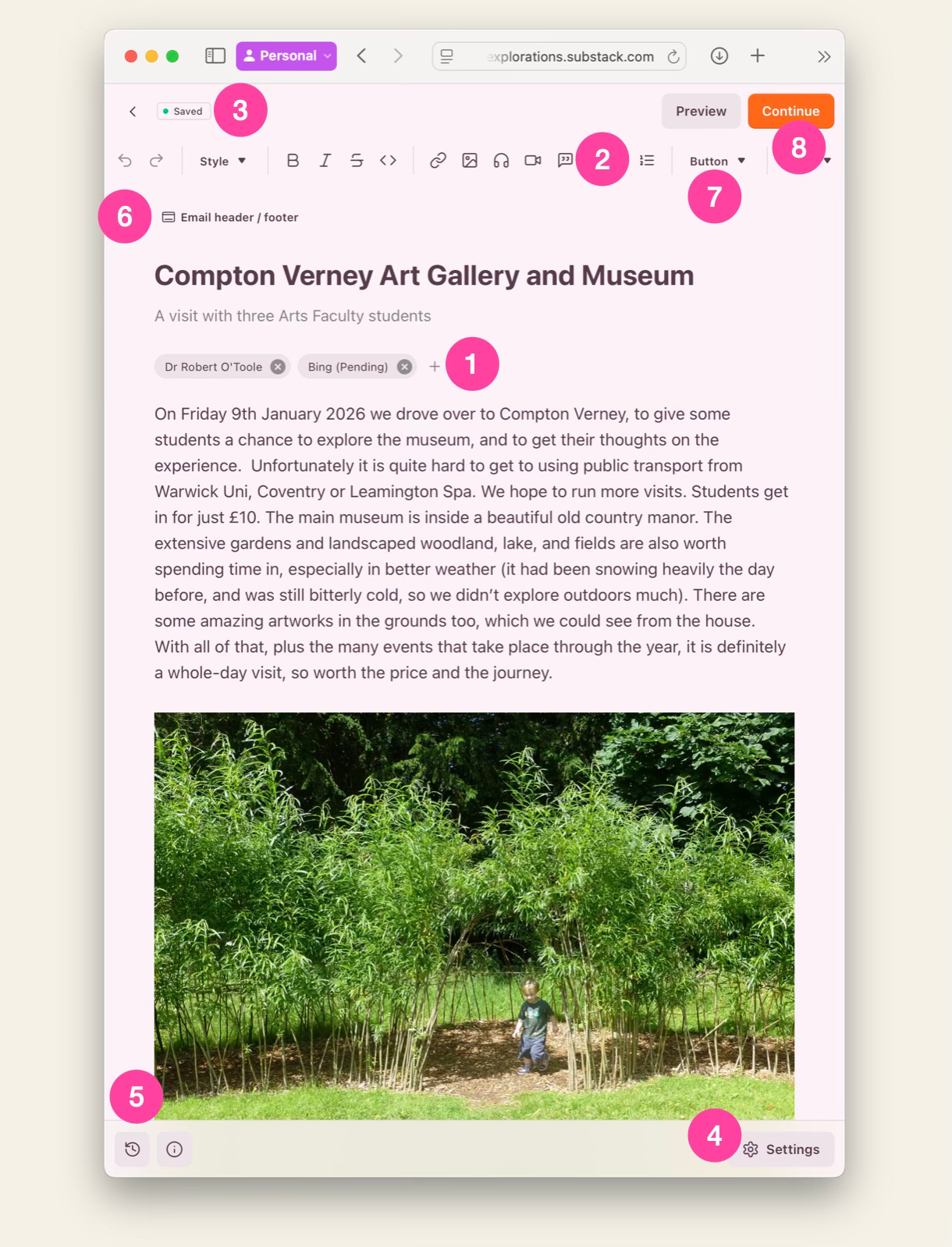
You can see there just how simple the editing interface is. The usual formatting tools are arranged along a line at point 2, as well as options to add images, audio and video. Edits are autosaved (3) as drafts until published. We can return to unpublished drafts later. The Settings button (4) gives access to the ability to add tags, commenting permissions (on or off) and more. We can access a version history (5) and roll-back to previous versions. We can add a special header that is only included in the version that is sent out by email (6). And the Button option (7) gives us the option to embed a simple form that can be used to subscribe.
Once we have finished, we use the Continue button (8) to go on to the publish interface, which includes options to add tags, allow comments, send via email (optional), and schedule for later publishing.
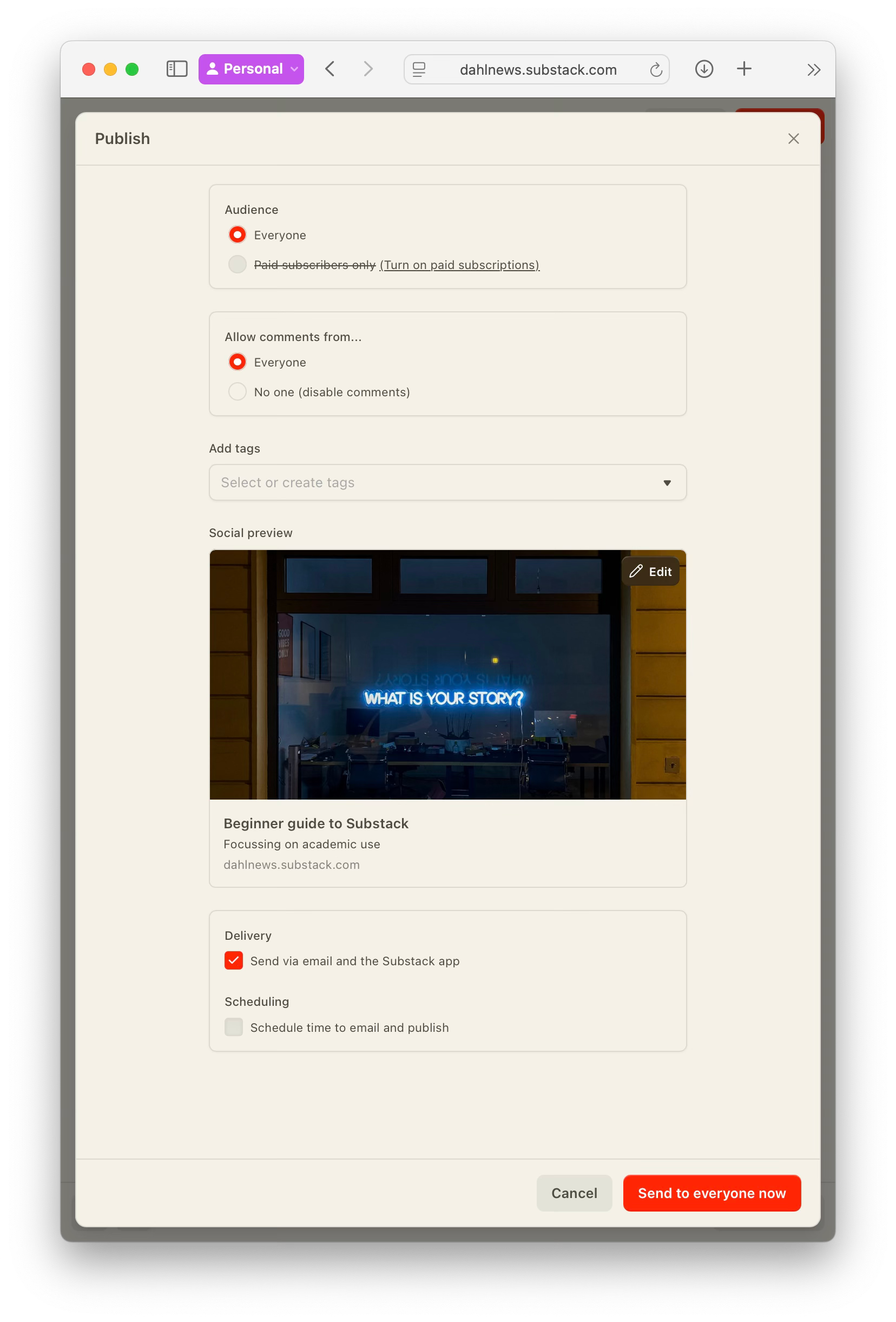
And that’s all there is to writing Substack articles, apart from the actual writing, which is the hard bit!
2. Set up your own publication[s]
This will only take a few minutes. But the workflow is a bit confusing, and some of the interface design does not help.
Remember that you first have to create a profile, and can then create publications.
2.1 Get a profile
It’s easiest to do this using on the web, going to http://substack.com/home and clicking on the Get Started button.

Once you have gone through the process and responded to the confirmation email, your profile has been created. You can just start using it as is, but you might now want to create a publication.
2.2 Create a publication
On your profile home page, click on More (1) and then select Settings (2).
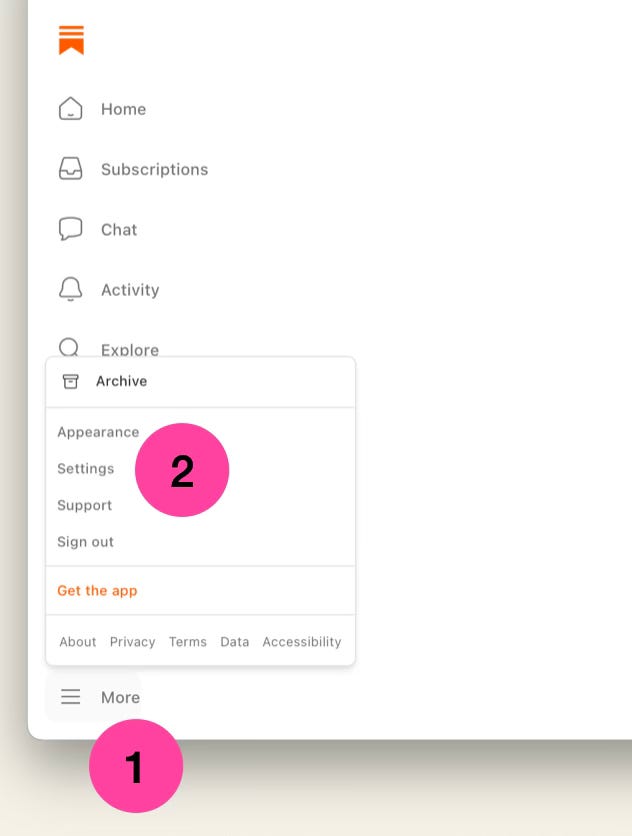
Confusingly it lists a ready made publication created using your handle.
Click on the button to Create Another Publication (3):
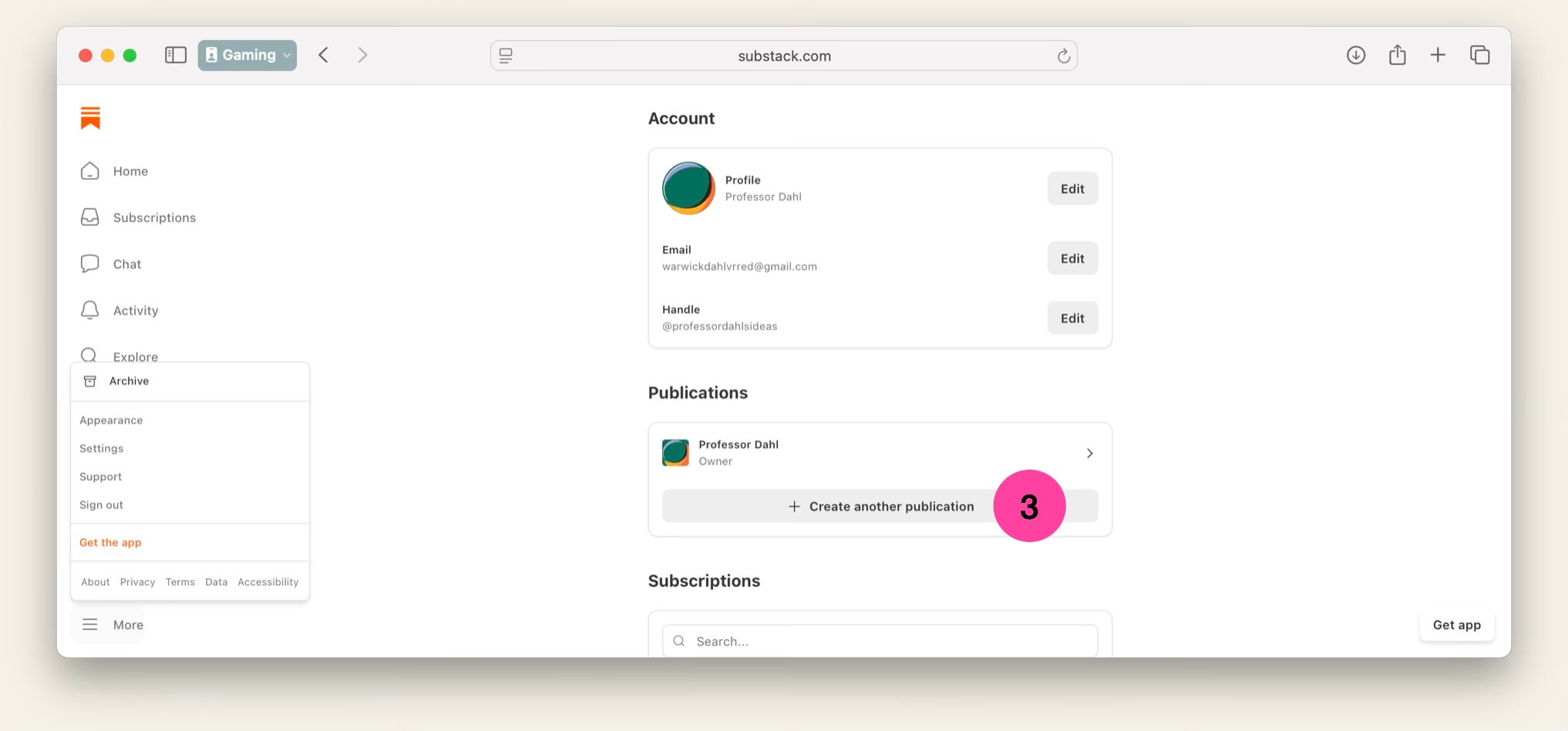
By default this will suggest a url using your profile’s handle, and then create your first publication (already listed above). At this point you can change the url to whatever you want. Remember that you can create as many separate publications as you want, or have a single one with a range of different categories (tags).
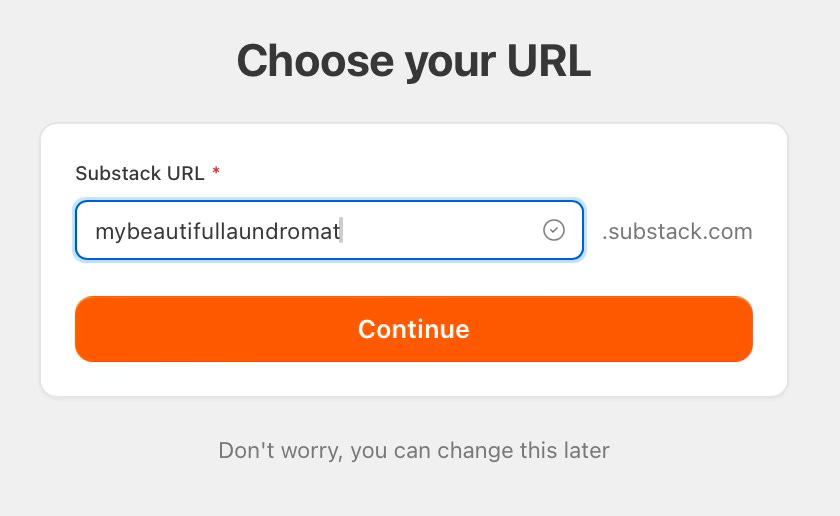
Go through the series of forms. You can invite people to subscribe, now or later.
And then you get to the dashboard for the new publication. From which you can create a new post.
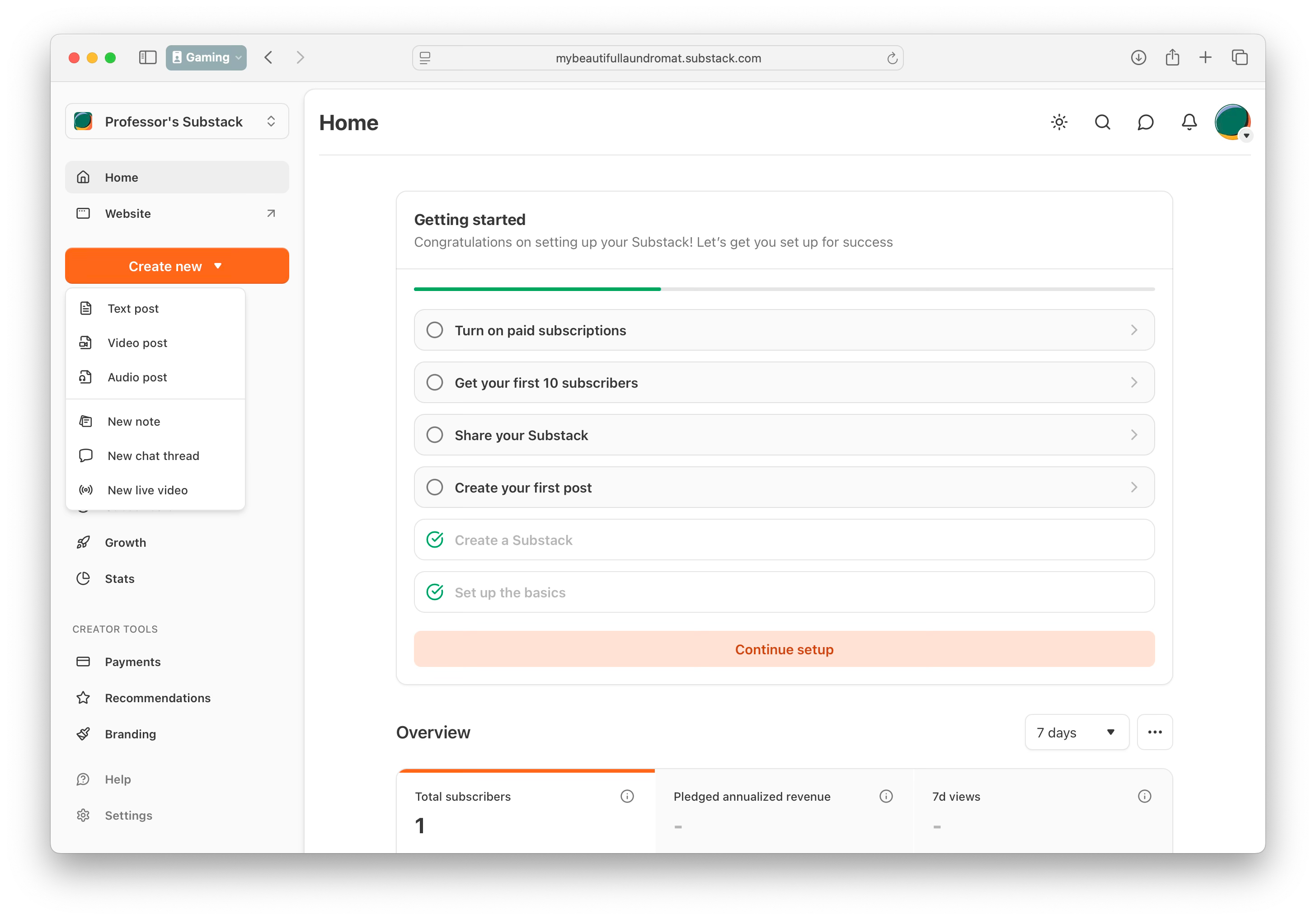
View the website it has created:
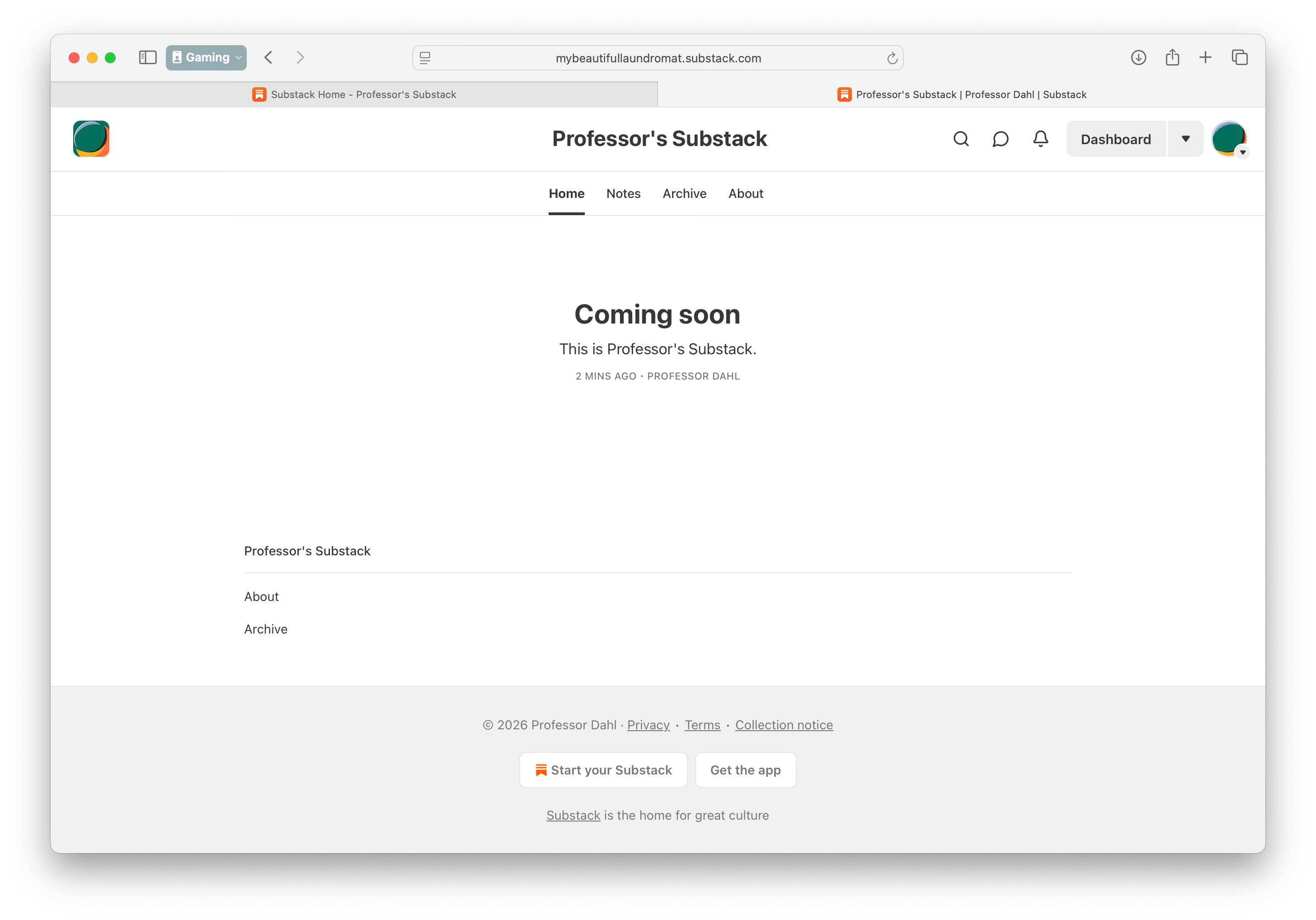
Note that the publication url I created is http://mybeautifullaundromat.substack.com but the title is still Professor’s Substack (based on the name I used in the profile). You can change this and many other things in Settings. We will go into configuring the site design and much more in further articles in this guid.
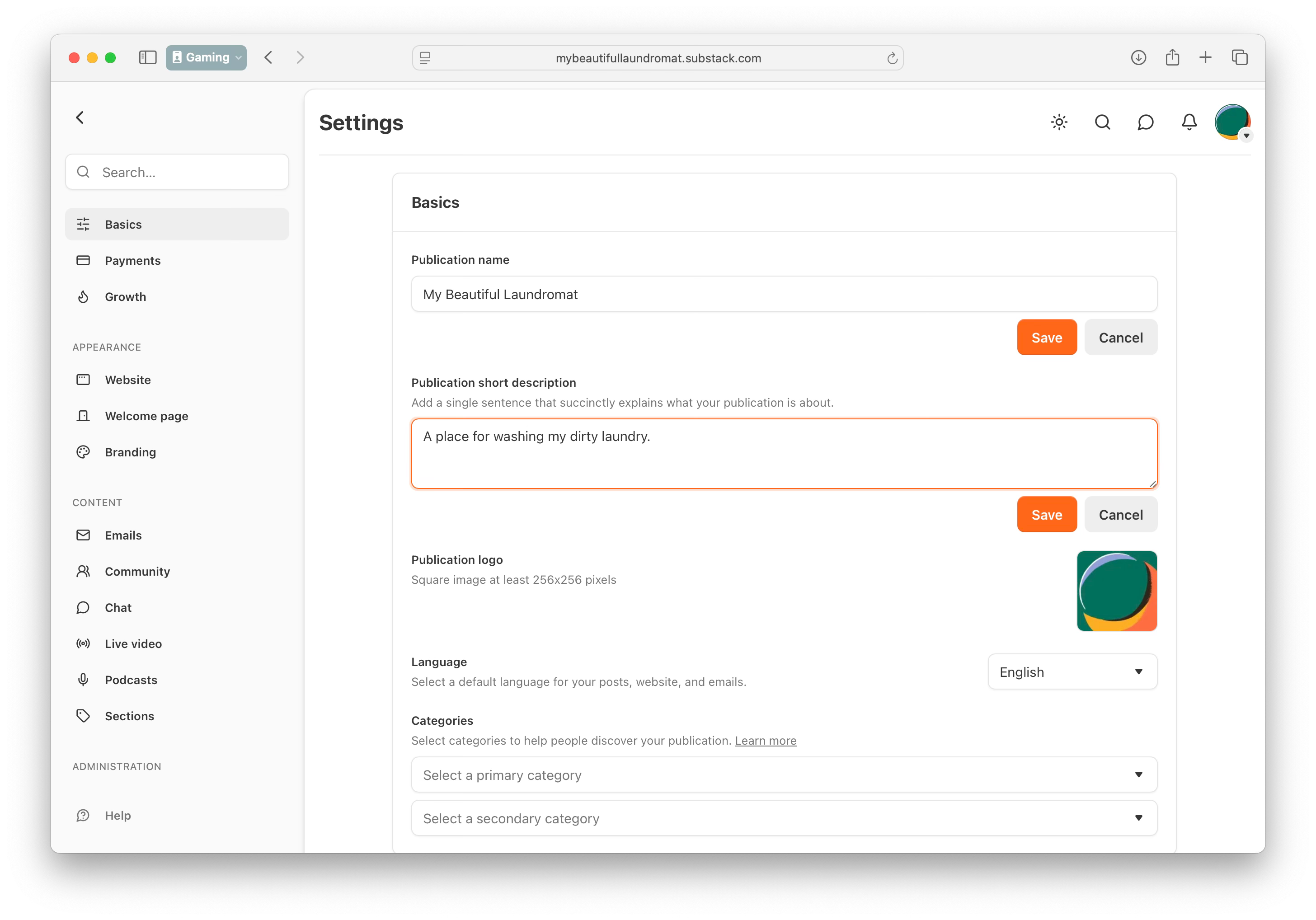
And that’s it. We have a profile and a publication, ready to rock!